Shapes
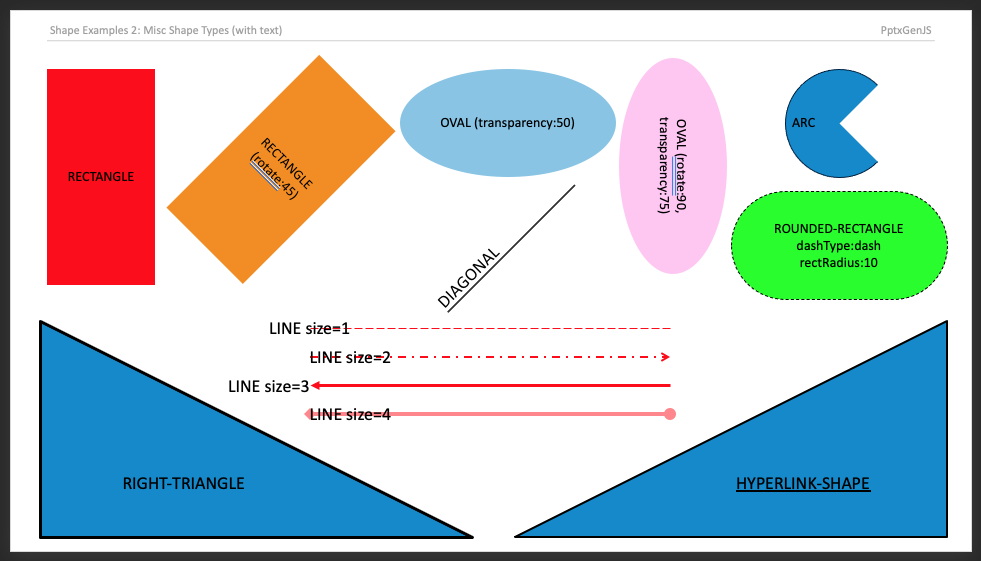
Almost 200 shape types can be added to Slides (see ShapeType enum).
Usage
// Shapes without text
slide.addShape(pres.ShapeType.rect, { fill: { color: "FF0000" } });
slide.addShape(pres.ShapeType.ellipse, {
  fill: { type: "solid", color: "0088CC" },
});
slide.addShape(pres.ShapeType.line, { line: { color: "FF0000", width: 1 } });

// Pattern (preset hatch) fill
slide.addShape(pres.ShapeType.rect, {
  fill: {
    type: "pattern",
    preset: "ltUpDiag", // one of 54 ECMA-376 ST_PresetPatternVal names (e.g. pct50, cross, dkHorz)
    foreColor: "7C3AED", // hatch color (hex or SchemeColor)
    backColor: "1A1A24", // optional background; omit for a transparent background
  },
});

// Picture (image) fill
slide.addShape(pres.ShapeType.rect, {
  fill: {
    type: "image",
    path: "./assets/bg.png", // or data: "image/png;base64,iVBOR..." (like addImage)
    sizing: "stretch", // "stretch" (default, scales to the shape) | "tile" (repeats)
    transparency: 20, // optional 0–100 (%)
  },
});

// Shapes with text
slide.addText("ShapeType.rect", {
  shape: pres.ShapeType.rect,
  fill: { color: "FF0000" },
});
slide.addText("ShapeType.ellipse", {
  shape: pres.ShapeType.ellipse,
  fill: { color: "FF0000" },
});
slide.addText("ShapeType.line", {
  shape: pres.ShapeType.line,
  line: { color: "FF0000", width: 1, dashType: "lgDash" },
});
Properties
Position/Size Props (PositionProps)
| Name | Type | Default | Description | Possible Values |
|---|---|---|---|---|
x | number | 1.0 | hor location (inches) | 0-n |
x | string | hor location (percent) | 'n%'. (Ex: {x:'50%'} middle of the Slide) | |
y | number | 1.0 | ver location (inches) | 0-n |
y | string | ver location (percent) | 'n%'. (Ex: {y:'50%'} middle of the Slide) | |
w | number | 1.0 | width (inches) | 0-n |
w | string | width (percent) | 'n%'. (Ex: {w:'50%'} 50% the Slide width) | |
h | number | 1.0 | height (inches) | 0-n |
h | string | height (percent) | 'n%'. (Ex: {h:'50%'} 50% the Slide height) |
Shape Props (ShapeProps)
| Name | Type | Description | Possible Values |
|---|---|---|---|
align | string | alignment | left or center or right. Default: left |
fill | ShapeFillProps | fill props | Fill color/transparency props |
flipH | boolean | flip Horizontal | true or false |
flipV | boolean | flip Vertical | true or false |
hyperlink | HyperlinkProps | hyperlink props | (see type link) |
line | ShapeLineProps | border line props | (see type link) |
rectRadius | number | rounding radius | 0 to 1. (Ex: 0.5. Only for pptx.shapes.ROUNDED_RECTANGLE) |
rotate | number | rotation (degrees) | -360 to 360. Default: 0 |
reflection | ReflectionProps | reflection effect props | Ex: { blur: 0.5, distance: 0, size: 50, opacity: 50, fadeDirection: 90 } |
softEdge | SoftEdgeProps | soft-edge (feather) props | Ex: { radius: 0.1 } (radius in inches) |
bevel | Shape3DProps | 3-D bevel/extrusion props | Ex: { top: { preset: 'circle', width: 0.06, height: 0.06 }, depth: { color: '5B21B6', amount: 0.08 }, material: 'plastic' } |
shadow | ShadowProps | shadow props | (see type link) |
objectName | string | optional object name | Ex: "Customer Network Diagram 99" |
Examples
Reflection effect
Add a mirror-style reflection beneath a shape (or image). Coexists with shadow/glow in a single effect list.
let slide = pptx.addSlide();
slide.addShape(pptx.shapes.RECTANGLE, {
	x: 1, y: 1, w: 4, h: 2, fill: { color: "7C3AED" },
	reflection: { blur: 0.5, distance: 0, size: 50, opacity: 50, fadeDirection: 90 },
});
All reflection fields are optional and default to { blur: 0.5, distance: 0, size: 50, opacity: 50, fadeDirection: 90 }. Units: blur/distance in points, size/opacity as percent (0–100), fadeDirection in degrees.
Soft-edge effect
Feather (soften) a shape or image edge. Coexists with shadow/glow/reflection in a single effect list (emitted last, per the OOXML canonical order).
let slide = pptx.addSlide();
slide.addShape(pptx.shapes.ELLIPSE, {
	x: 1, y: 1, w: 3, h: 3, fill: { color: "7C3AED" },
	softEdge: { radius: 0.1 },
});
radius is required and is given in inches (the feather radius); a radius <= 0 omits the effect.
3-D bevel / extrusion
Add a 3-D bevel, extrusion (depth), contour, and surface material to a shape. Emits an <a:scene3d> + <a:sp3d> pair on the shape (a default camera/light rig is always included so the effect renders in PowerPoint).
let slide = pptx.addSlide();
slide.addShape(pptx.shapes.RECTANGLE, {
	x: 1, y: 1, w: 3, h: 2, fill: { color: "7C3AED" },
	bevel: {
		top:     { preset: "circle", width: 0.06, height: 0.06 }, // inches
		bottom:  { preset: "circle", width: 0.06, height: 0.06 },
		depth:   { color: "5B21B6", amount: 0.08 },               // extrusion (inches)
		contour: { color: "000000", width: 0.01 },                // inches
		material: "plastic",
	},
});
All bevel sub-fields are optional; bevel width/height/depth.amount/contour.width are given in inches. An empty bevel: {} (or no bevel) emits nothing. Shapes only — 3-D on images and custom camera/light-rig overrides are not yet supported.
Samples
Sample code all available types: demos/modules/demo_shape.mjs