Text
Text shapes can be added to Slides.
Usage
slide.addText([{ text: "TEXT", options: { OPTIONS } }]);
Properties
Position/Size Props (PositionProps)
| Name | Type | Default | Description | Possible Values |
|---|---|---|---|---|
x | number | 1.0 | hor location (inches) | 0-n |
x | string | hor location (percent) | 'n%'. (Ex: {x:'50%'} middle of the Slide) | |
y | number | 1.0 | ver location (inches) | 0-n |
y | string | ver location (percent) | 'n%'. (Ex: {y:'50%'} middle of the Slide) | |
w | number | 1.0 | width (inches) | 0-n |
w | string | width (percent) | 'n%'. (Ex: {w:'50%'} 50% the Slide width) | |
h | number | 1.0 | height (inches) | 0-n |
h | string | height (percent) | 'n%'. (Ex: {h:'50%'} 50% the Slide height) |
Base Properties (TextPropsOptions)
| Option | Type | Unit | Default | Description | Possible Values |
|---|---|---|---|---|---|
align | string | left | alignment | left or center or right | |
baseline | number | points | text baseline value | 0-256 | |
bold | boolean | false | bold text | true or false | |
breakLine | boolean | false | appends a line break | true or false (only applies when used in text options) Ex: {text:'hi', options:{breakLine:true}} | |
bullet | boolean | false | bulleted text | true or false | |
bullet | object | bullet options | object with type, characterCode or numberType. Ex: bullet:{type:'number'}. Ex: bullet:{characterCode:'2605'}. Ex: {numberType:'alphaLcPeriod'} | ||
charSpacing | number | points | character spacing | 1-256. Ex: { charSpacing:12 } | |
color | string | object | text color | hex color code or scheme color. Ex: { color:'0088CC' }. Also accepts a gradient object to fill the glyphs: { color:{ type:'gradient', direction:'horizontal', stops:[{position:0,color:'FF0000'},{position:100,color:'0000FF'}] } } | ||
fill | string | fill/bkgd color | hex color code or scheme color. Ex: { color:'0088CC' } | ||
fit | string | none | text fit options | none, shrink, resize. Ex: { fit:'shrink' } | |
fontFace | string | font face | Ex: { fontFace:'Arial'} | ||
fontSize | number | points | font size | 1-256. Ex: { fontSize:12 } | |
glow | object | text glow | object with size, opacity, color (opt). Ex: glow:{size:10, opacity:0.75, color:'0088CC'} | ||
highlight | string | highlight color | hex color code or scheme color. Ex: { color:'0088CC' } | ||
hyperlink | string | add hyperlink | object with url or slide (tooltip optional; on:'hover' for mouse-over activation; action:'nextSlide'|'prevSlide'|'firstSlide'|'lastSlide'|'endShow'|'slide' for navigation jumps). Ex: { hyperlink:{url:'https://github.com'} } | ||
indentLevel | number | level | 0 | bullet indent level | 1-32. Ex: { indentLevel:1 } |
isTextBox | boolean | false | PPT "Textbox" | true or false | |
italic | boolean | false | italic text | true or false | |
lang | string | en-US | language setting | Ex: { lang:'zh-TW' } (Set this when using non-English fonts like Chinese) | |
line | object | line/border | adds a border. Ex: line:{ width:'2', color:'A9A9A9' } | ||
lineSpacing | number | points | line spacing points | 1-256. Ex: { lineSpacing:28 } | |
lineSpacingMultiple | number | percent | line spacing multiple | 0.0-9.99 | |
margin | number | points | margin | 0-99 (ProTip: use the same value from CSS padding) | |
outline | object | text outline options | Options: color & size. Ex: outline:{ size:1.5, color:'FF0000' } | ||
paraSpaceAfter | number | points | paragraph spacing | Paragraph Spacing: After. Ex: { paraSpaceAfter:12 } | |
paraSpaceBefore | number | points | paragraph spacing | Paragraph Spacing: Before. Ex: { paraSpaceBefore:12 } | |
rectRadius | number | inches | rounding radius | rounding radius for ROUNDED_RECTANGLE text shapes | |
rotate | integer | degrees | 0 | text rotation degrees | 0-360. Ex: {rotate:180} |
rtlMode | boolean | false | enable Right-to-Left mode | true or false | |
shadow | object | text shadow options | see "Shadow Properties" below. Ex: shadow:{ type:'outer' } | ||
softBreakBefore | boolean | false | soft (shift-enter) break | Add a soft line-break (shift+enter) before line text content | |
strike | string | text strikethrough | dblStrike or sngStrike | ||
subscript | boolean | false | subscript text | true or false | |
superscript | boolean | false | superscript text | true or false | |
transparency | number | 0 | transparency | Percentage: 0-100 | |
underline | TextUnderlineProps | underline color/style | TextUnderlineProps | ||
valign | string | vertical alignment | top or middle or bottom | ||
vert | string | horz | text direction | eaVert or horz or mongolianVert or vert or vert270 or wordArtVert or wordArtVertRtl | |
wrap | boolean | true | text wrapping | true or false |
Shadow Properties (ShadowProps)
| Option | Type | Unit | Default | Description | Possible Values |
|---|---|---|---|---|---|
type | string | outer | shadow type | outer or inner | |
angle | number | degrees | shadow angle | 0-359. Ex: { angle:180 } | |
blur | number | points | blur size | 1-256. Ex: { blur:3 } | |
color | string | text color | hex color code or scheme color constant. Ex: { color:'0088CC' } | ||
offset | number | points | offset size | 1-256. Ex: { offset:8 } | |
opacity | number | percent | opacity | 0-1. Ex: opacity:0.75 |
Examples
Text Options
var pptx = new PptxGenJS();
var slide = pptx.addSlide();

// EX: Dynamic location using percentages
slide.addText("^ (50%/50%)", { x: "50%", y: "50%" });

// EX: Basic formatting
slide.addText("Hello", { x: 0.5, y: 0.7, w: 3, color: "0000FF", fontSize: 64 });
slide.addText("World!", { x: 2.7, y: 1.0, w: 5, color: "DDDD00", fontSize: 90 });

// EX: More formatting options
slide.addText("Arial, 32pt, green, bold, underline, 0.5 margin", {
    x: 0.5,
    y: 5.0,
    w: "90%",
    margin: 0.5,
    fontFace: "Arial",
    fontSize: 32,
    color: "00CC00",
    bold: true,
    underline: true,
    isTextBox: true,
});

// EX: Format some text
slide.addText("Hello World!", { x: 2, y: 4, fontFace: "Arial", fontSize: 42, color: "00CC00", bold: true, italic: true, underline: true });

// EX: Multiline Text / Line Breaks - use "\n" to create line breaks inside text strings
slide.addText("Line 1\nLine 2\nLine 3", { x: 2, y: 3, color: "DDDD00", fontSize: 90 });

// EX: Format individual words or lines by passing an array of text objects with `text` and `options`
slide.addText(
    [
        { text: "word-level", options: { fontSize: 36, color: "99ABCC", align: "right", breakLine: true } },
        { text: "formatting", options: { fontSize: 48, color: "FFFF00", align: "center" } },
    ],
    { x: 0.5, y: 4.1, w: 8.5, h: 2.0, fill: { color: "F1F1F1" } }
);

// EX: Bullets
slide.addText("Regular, black circle bullet", { x: 8.0, y: 1.4, w: "30%", h: 0.5, bullet: true });
// Use line-break character to bullet multiple lines
slide.addText("Line 1\nLine 2\nLine 3", { x: 8.0, y: 2.4, w: "30%", h: 1, fill: { color: "F2F2F2" }, bullet: { type: "number" } });
// Bullets can also be applied on a per-line level
slide.addText(
    [
        { text: "I have a star bullet", options: { bullet: { characterCode: "2605" }, color: "CC0000" } },
        { text: "I have a triangle bullet", options: { bullet: { characterCode: "25BA" }, color: "00CD00" } },
        { text: "no bullets on this line", options: { fontSize: 12 } },
        { text: "I have a normal bullet", options: { bullet: true, color: "0000AB" } },
    ],
    { x: 8.0, y: 5.0, w: "30%", h: 1.4, color: "ABABAB", margin: 1 }
);

// EX: Paragraph Spacing
slide.addText("Paragraph spacing - before:12pt / after:24pt", {
    x: 1.5,
    y: 1.5,
    w: 6,
    h: 2,
    fill: { color: "F1F1F1" },
    paraSpaceBefore: 12,
    paraSpaceAfter: 24,
});

// EX: Hyperlink: Web
slide.addText(
    [
        {
            text: "PptxGenJS Project",
            options: { hyperlink: { url: "https://github.com/gitbrent/pptxgenjs", tooltip: "Visit Homepage" } },
        },
    ],
    { x: 1.0, y: 1.0, w: 5, h: 1 }
);
// EX: Hyperlink: Slide in Presentation
slide.addText(
    [
        {
            text: "Slide #2",
            options: { hyperlink: { slide: 2, tooltip: "Go to Summary Slide" } },
        },
    ],
    { x: 1.0, y: 2.5, w: 5, h: 1 }
);

// EX: Hyperlink: Hover (activates on mouse-over, emits <a:hlinkMouseOver>)
slide.addText(
    [
        {
            text: "Hover for Homepage",
            options: { hyperlink: { url: "https://github.com/gitbrent/pptxgenjs", tooltip: "Visit Homepage", on: "hover" } },
        },
    ],
    { x: 1.0, y: 4.0, w: 5, h: 1 }
);

// EX: Hyperlink: Navigation action jump (emits <a:hlinkClick action="ppaction://hlinkshowjump?jump=nextslide"/>)
slide.addText(
    [
        {
            text: "Next Slide \u2192",
            options: { hyperlink: { action: "nextSlide", tooltip: "Go to next slide" } },
        },
    ],
    { x: 1.0, y: 5.0, w: 5, h: 1 }
);

// EX: Drop/Outer Shadow
slide.addText("Outer Shadow", {
    x: 0.5,
    y: 6.0,
    fontSize: 36,
    color: "0088CC",
    shadow: { type: "outer", color: "696969", blur: 3, offset: 10, angle: 45 },
});

// EX: Text Outline
slide.addText("Text Outline", {
    x: 0.5,
    y: 6.0,
    fontSize: 36,
    color: "0088CC",
    outline: { size: 1.5, color: "696969" },
});

// EX: Formatting can be applied at the word/line level
// Provide an array of text objects with the formatting options for that `text` string value
// Line-breaks work as well
slide.addText(
    [
        { text: "word-level\nformatting", options: { fontSize: 36, fontFace: "Courier New", color: "99ABCC", align: "right", breakLine: true } },
        { text: "...in the same textbox", options: { fontSize: 48, fontFace: "Arial", color: "FFFF00", align: "center" } },
    ],
    { x: 0.5, y: 4.1, w: 8.5, h: 2.0, margin: 0.1, fill: { color: "232323" } }
);

pptx.writeFile("Demo-Text");
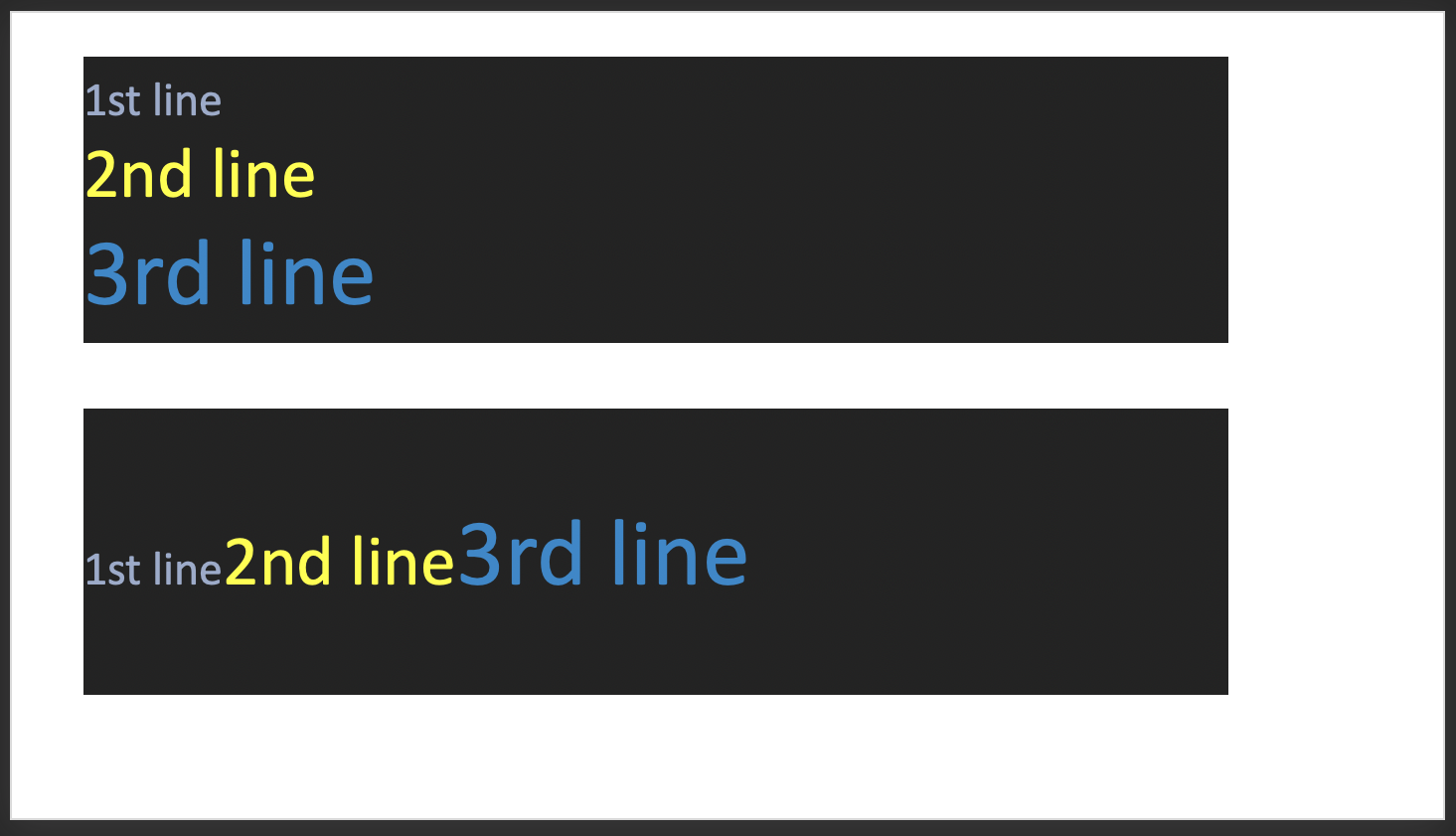
Line Break Options
- Use the
breakLineprop to force line breaks when composing text objects using an array of text objects. - Use the
softBreakBeforeprop to create a "soft line break" (shift-enter)
let arrTextObjs1 = [
    { text: "1st line", options: { fontSize: 24, color: "99ABCC", breakLine: true } },
    { text: "2nd line", options: { fontSize: 36, color: "FFFF00", breakLine: true } },
    { text: "3rd line", options: { fontSize: 48, color: "0088CC" } },
];
slide.addText(arrTextObjs1, { x: 0.5, y: 1, w: 8, h: 2, fill: { color: "232323" } });

let arrTextObjs2 = [
    { text: "1st line", options: { fontSize: 24, color: "99ABCC", breakLine: false } },
    { text: "2nd line", options: { fontSize: 36, color: "FFFF00", breakLine: false } },
    { text: "3rd line", options: { fontSize: 48, color: "0088CC" } },
];
slide.addText(arrTextObjs2, { x: 0.5, y: 4, w: 8, h: 2, fill: { color: "232323" } });
Line Break Examples
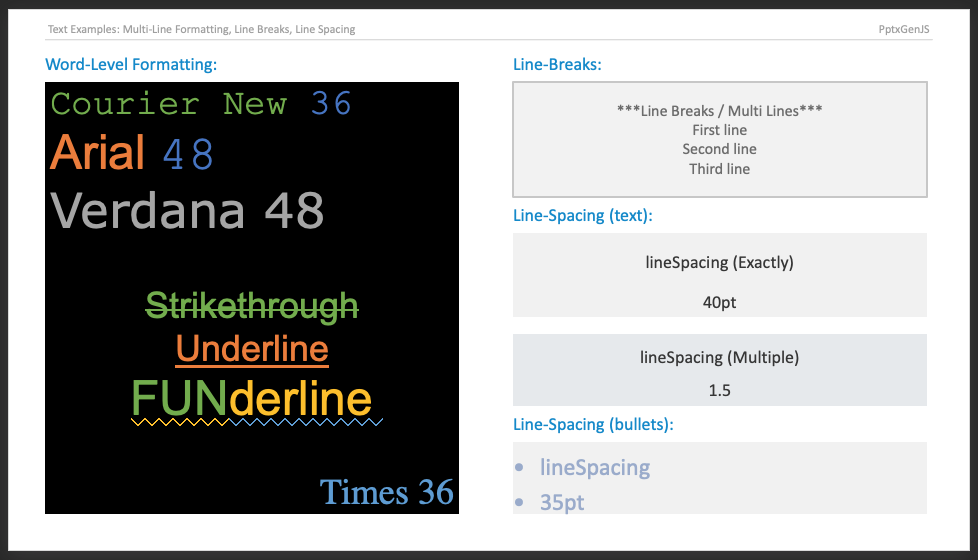
Text Formatting
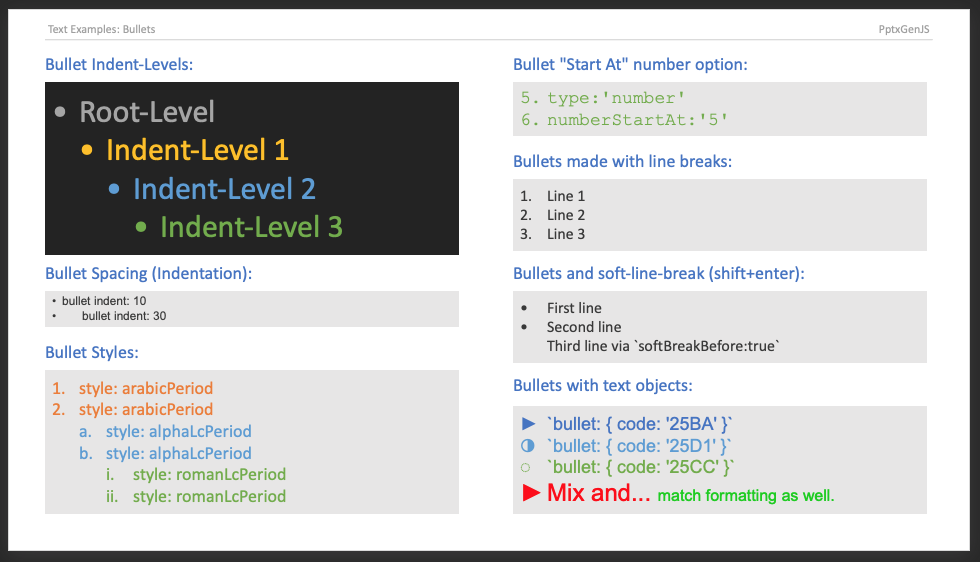
Bullet Options
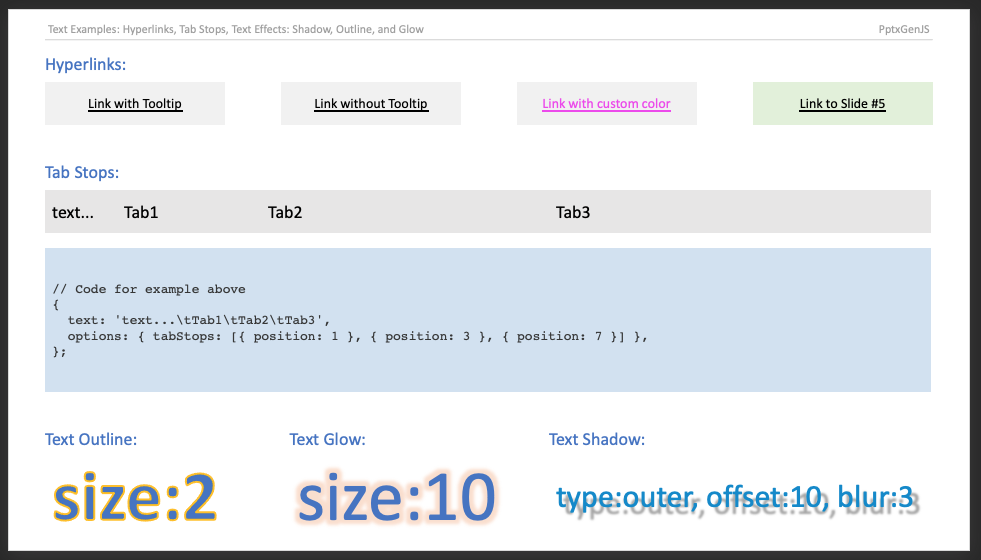
Tab Stops
Samples
Sample code: demos/modules/demo_text.mjs